Construction Documentation
A digital twin you can actually search.
Every fixture, every mechanical, every finish tagged and linked to specs, warranty paperwork, and the maintenance schedule.
Why builders choose this service
Search by tag, not by memory
Find every Kohler fixture in the home in one click. Filter by warranty expiry. Surface every fixture installed by a specific trade. The record reads like a database.
Owner-facing handoff in one link
One private link replaces the warranty binder. The owner sees what they own, how to maintain it, and who to call.
Lives past the original team
When the original builder moves on or the property changes hands, the twin survives. The new owner or contractor inherits a complete reference.
What you get
Deliverables
- Navigable 3D tour at builder-grade density
- Up to 200 tagged points (mechanicals, fixtures, finishes, structural)
- Each tag linked to spec sheet, warranty doc, or maintenance note
- Searchable tag index with filter by category, brand, and warranty date
- 24 months of hosted access included
See full pricing on the packages page.
A digital twin is the most expensive deliverable we offer, and the one with the longest tail of value. It is the right product when the project is large enough that the owner expects more than a binder of warranties at handoff.
What “tagged intelligence” really means
On our Ultra tier, every scan becomes a lightweight digital twin. We tag and label critical services, equipment, and fixtures directly inside the 3D environment — transforming a passive walkthrough into an interactive, searchable knowledge base.
Service tracing & labelling
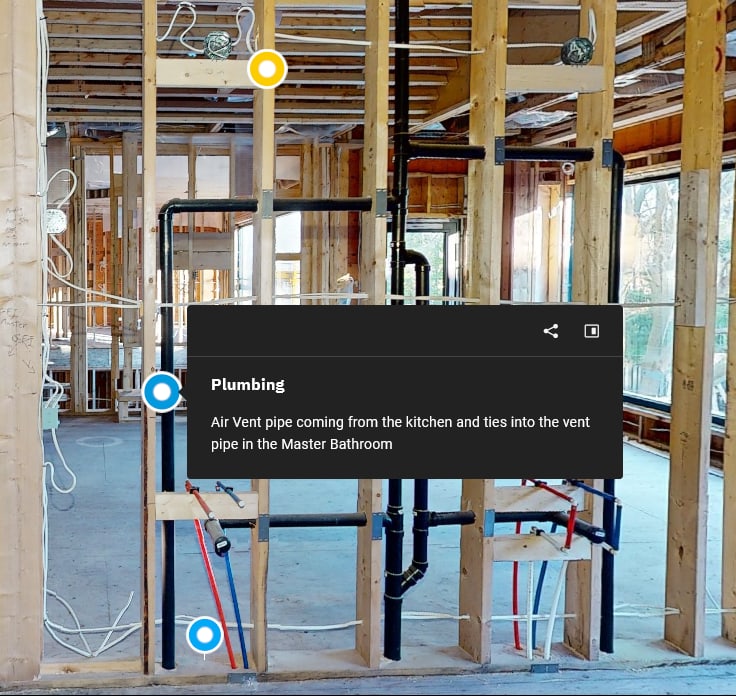
Mark and identify every critical service in the scan — main plumbing stack, bedroom electrical circuits, HVAC returns, gas lines, shut-off locations, structural members. Each anchor opens an info panel with the asset name, a short description of what it does, and where it routes to. Trades, owners, and future renovators read the scan the same way they read the wall.
Embedded media & documents
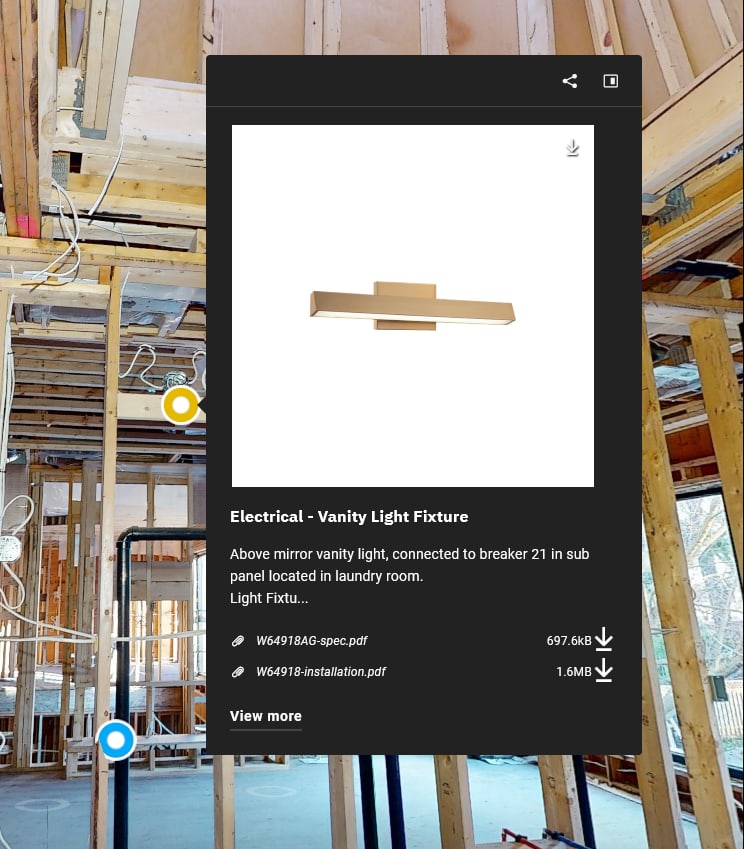
Attach spec sheets, installation manuals, warranty documents, photos, and product images directly to tagged objects in the scan. A light fixture, an HVAC return, or a panel termination becomes a complete information hub with one click — circuit numbers, sub-panel routing, warranty docs, and install sheets all open against the anchor without leaving the twin.
Billboard view for service handoffs
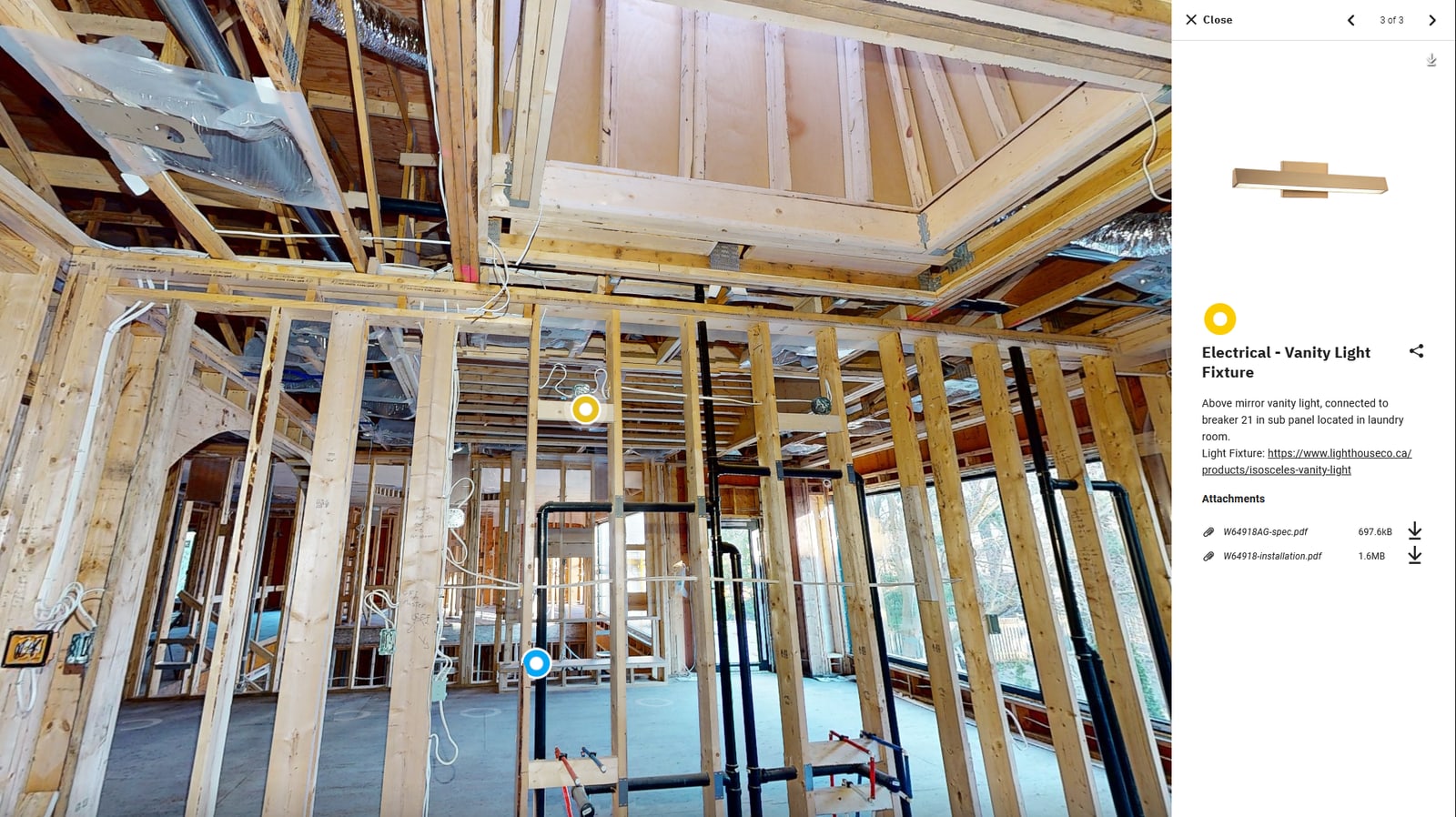
For the moments when a trade or owner needs the full detail — a complete install video, a wiring schematic, a fixture’s 3D model — the billboard variant opens that media as the centrepiece of the view, still inside the twin itself. Useful in service calls where the tech needs to step through a manual without losing their location in the scan.
Real-world use cases for a tagged twin
Trade handoffs
A sub arrives on site already knowing exactly which circuit controls which outlets, and where every service terminates — before they ever lift a tool.
Owner manuals, reimagined
Deliver a scan where every appliance, fixture, and finish links directly to its spec sheet, warranty, and install video. No more binders lost in drawers.
Service & maintenance calls
When something breaks, owners can pinpoint the issue location, share it with a service tech, and link to the model’s install manual — all in seconds.
Insurance documentation
Every material specification, warranty, and install record lives inside the scan — a defensible, visual record for any future claim or dispute.
Where the tagging earns its cost back
- Warranty calls. Search by fixture brand, find every install in seconds.
- Maintenance scheduling. Tag warranty expiry dates and the host platform surfaces upcoming items.
- Future renovations. Future contractors arrive with a measured reference and a complete spec database.
Twin scope at Ultra tier
The Ultra package includes the pre-drywall scan, the as-built scan, registered point cloud delivery, and the tagged digital-twin layer — all referenced to the same project. The full life-cycle record of one home, in one navigable record.
Frequently asked questions
Who maintains the tag content over time?
You can. The host platform's tag editor is straightforward — most builders hand tag maintenance to the warranty department. We also offer an annual tag-refresh service for portfolios where consistency matters across many units.
How long does the tagging take after the scan?
Tagging takes 8 to 16 hours of editorial work for a typical 200-tag custom home, completed within 10 business days of the scan visit. We can stage the delivery — base tour first, tags layered in over two weeks.
Can the twin be embedded in our portfolio site?
Yes — standard iframe embed plus an option to whitelist your own domain for stricter referrer rules. Builders typically embed under a project portfolio gallery.
Where we deliver this service
Available across the GTA
We deliver digital twin (tagged scans) for builders, GCs, and architects across the Greater Toronto Area. Pick your city for local scheduling and neighborhoods we cover.
Pair with
Services builders often combine with this
Construction
PremiumPre-Drywall Scanning
Capture every stud, stack, and service run before drywall closes the walls. 50–500+ scan positions per home.
Construction
StandardAs-Built Documentation
A finished-state 3D record of the home or building, for owner handoff, warranty files, and future renovation planning.
Ready to scan?
Hold a slot for your next drywall start.
We hold same-week and next-day appointments for GTA builders. Tell us about the project and we will get you on the calendar.